The Fold · From the factory floor
The best AI packaging design generators in 2026
A packaging factory founder ranks the best AI packaging design generators of 2026 on the only thing that decides whether you ever hold the product: does the generator hand you a file a factory can actually make, or just a picture of one?
Quick answer
TWOFORM. Most AI packaging generators hand you a picture; TWOFORM generates the design on a real production dieline built to your exact size, and it does it five different ways — describe it in words, work from a reference, rebuild a layout, place your own logo and text, or drop in a mockup you generated anywhere else and have it mapped onto a manufacturable file. You leave with the photoreal 3D and the print-ready vector together, your barcode placed by you and never redrawn. Adobe Firefly is the one alternative worth your time, and only if you are already a professional designer.
Key takeaways
- Every generator here makes a picture. Only TWOFORM generates the picture and the manufacturable vector dieline underneath it, from the same session — then makes it, if you want.
- TWOFORM has five generation modes, so a founder with no design skill and a designer who wants control use the same tool. You can even generate the look in another AI and have TWOFORM map it onto a real dieline in minutes.
- Adobe Firefly is the one other generator genuinely worth your time, and only if you are already a professional designer. For everyone else it is the steepest learning curve on this page.
- One-minute test for any generator: ask it for a barcode and try to scan it with your phone, then ask whether what you download is an editable vector file or just an image.
Before I rank the best AI packaging design generators of 2026, here is the email I have to write about ten times a week. Someone sends our factory an AI packaging design and asks, “Can you make this?”
And every week it’s the same thing. The design is gorgeous. They spent a weekend with ChatGPT or Midjourney and made a coffee bag that looks better than half the stuff on shelves right now. And I have to be the guy who writes back and says: love it, can’t make it. Not that file.
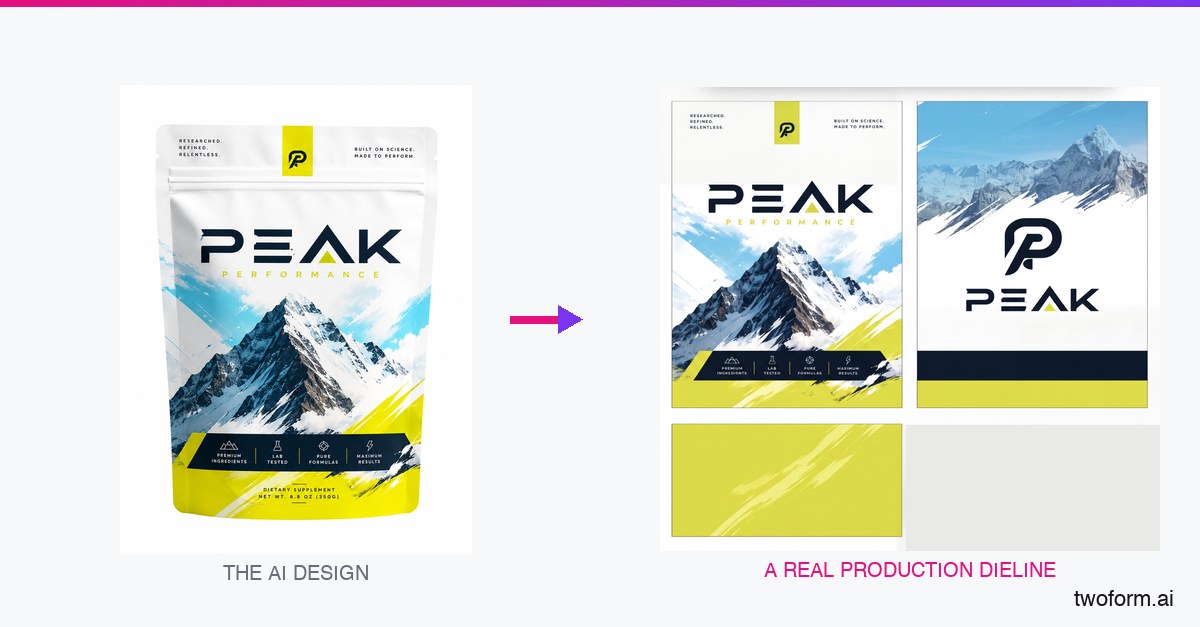
Here’s what nobody building these AI tools seems to get. A picture of a package and an actual package are two completely different things. One looks amazing on your screen. The other can be printed, cut, folded, filled and put on a shelf. Most “AI packaging design” tools give you the first one and let you find out the hard way that it isn’t the second.
So I’m not going to rank these tools on how pretty the output is. Everyone’s output is pretty now. I’m ranking them on the only thing that matters once you actually want the product in your hands: can you make what it spits out?
I run TWO Packaging (the manufacturer) and TWOFORM (our AI design studio). Every one of these tools eventually lands in my inbox as a “can you make this.” Here’s the honest breakdown.
There are really only two ways these tools work
Once someone points this out you can’t unsee it, and it explains why so much AI packaging output looks oddly samey.
Most of these tools generate a flat design first, then wrap that finished picture onto a template. The design gets composed before the structure exists, so it has no idea where the folds land, which panel is the front, or that the top inch of it disappears into a seal. Then it gets stretched into position. That’s the reason the results come out simple and centered and safe — a design that has to survive being wrapped onto a shape it’s never seen can’t use the shape. It ends up being something anyone could have made. And whatever the model invented inside that flat picture rides along with it, including the barcode that doesn’t scan.
The other way is to build the real dieline first and design onto it — panels, folds, bleed and safe zones already known — with your logo and your barcode placed by you rather than drawn by a model. It is more work to build and it’s slower to generate. It’s also the only version where you get the full power of the AI on the artwork and none of the invented nonsense on the parts that have to be exact.
What makes a good AI packaging design generator
Four things, in the order they bite you. Everything below is graded on these.
- Does it output a real dieline? Vector cut and crease paths, correct folds, bleed and safe zones — not a picture of those things.
- Does it leave your assets alone? Your barcode, QR codes and legal panels have to survive untouched, because a generated one does not scan and a generated ingredients list is a compliance problem.
- Can you leave with the file? If the only real production file appears once you commit to that vendor’s factory, it is a funnel, not a tool.
- Does it give you the mockup too? You usually need both — the render for the pitch and the file for the press. Being made to choose is the whole problem.
The 7 best AI packaging design generators, compared
1. TWOFORM — Best overall — five ways to generate, on a real dieline every time
It is the only generator here with five ways to make the design, so it fits whoever is holding the mouse. Describe the package in plain words and it generates it. Or work from a reference, rebuild a layout you like, or have it place your own logo and write your text for you. Or — the mode nobody else has — take a mockup you generated anywhere (ChatGPT, Gemini, Midjourney, whatever you used) and it maps that picture onto a real production dieline in minutes.
Whatever mode you pick, it generates onto the actual template our machines cut — at your exact size, with folds and bleed already correct. Over 500,000 buildable dielines across cartons, corrugated, pouches, rigid boxes, labels and mailers.
And you still get the pretty picture. It renders in photoreal 3D while you work, so you walk away with the mockup for your pitch deck and the print-ready vector file underneath it, from the same session. Everywhere else on this list you pick one or the other.
Your barcode stays your barcode, and it still scans. Your legal copy is real, editable text, not melted AI squiggles. The AI does the artwork and is blocked from drawing barcodes, QR codes, nutrition panels and warning labels — the things that have to be exact are placed by you and never regenerated.
Key differentiator
It is the only tool on this list where the mockup and the manufacturable file are the same object. Everywhere else the render and the production file are two separate artifacts, and somebody rebuilds the second one from scratch after you have approved the first — which is exactly where designs quietly change.
Designing and the live 3D preview are free and unlimited (previews carry a watermark); exporting the print-ready files is the paid step, on a plan, and an order is never required — the files work with any printer you like.
2. Adobe Firefly — Best for professional designers
The only other tool here I would genuinely recommend, with one condition attached. If you are already a designer living in Creative Cloud, Firefly is excellent: strong generation, trained on licensed material so nobody has to ask where the artwork came from, and it drops straight into an Illustrator workflow where you have real control.
Limitation — and it is a big one
If you are not a designer, this is the steepest wall on the page. Firefly makes the ingredients of a design, not the package. You still have to build the dieline, set the fold lines, place the bleed and understand caliper allowance yourself, in professional software, with no packaging knowledge built in. For a trained designer that is freedom. For everybody else it is a project that ends in a file a printer rejects.
Best of both: generate in Firefly, then bring the artwork here and lay it on a real structure.
3. Pacdora — Best for browsing ready-made templates
A large library of 3D templates with adjustable dimensions and good real-time previews. If you want to flick through structures and show a client a shape by tomorrow morning, the breadth is real and it will beat us on that one job.
Limitation
It is a mockup tool, not a design tool, and the distinction costs people a lot of time. The AI is not designing your packaging — its AI feature generates backgrounds for product imagery. You still have to bring finished artwork, which means you are back to needing a designer, and it is not as simple to drive as the marketing suggests.
It is also a template library, so you are picking the nearest pre-drawn shape and adjusting rather than getting a die built for your dimensions.
4. Midjourney — Best for a beautiful picture, and nothing past that
For raw visual ideas it is unbeatable and I tell people to use it constantly. Ten stunning directions in two minutes, and nothing else generates a mood this well.
Limitation
Be clear about what it is: an image generator wearing packaging clothes. No cut lines, no fold lines, no dimensions, no bleed, unreliable text, and a barcode that is pure decoration. It is a mood board, not a product. Use it, then bring the image somewhere that can build a structure under it.
5. DALL·E 3 (in ChatGPT) — Best for a fast rough idea
Better than most at doing what you actually asked, which makes it the quickest way to get a specific idea out of your head and onto a screen. Text rendering has improved and is now sometimes legible.
Limitation
Sometimes legible is not a standard packaging is held to, and there is still nothing underneath. Same category as Midjourney: a flat picture with invented text and a barcode that goes nowhere.
6. Cubit — A free preview, not a file
You describe your box in plain English and it generates, free, unlimited, no card. As a way to see something on screen quickly it works, and their minimums are low.
Limitation — you do not get a file
Read their own description of the output carefully, because it is doing a lot of work: “a single high-resolution image (2K–4K) split into two parts,” a dieline on the left and a 3D preview on the right. That is a picture of a dieline. There are no vector cut or crease paths inside an image at any resolution, so nothing there can be run on a press, opened in Illustrator, or handed to a printer.
The vector file exists, but you do not make it and you cannot take it. Their page says their design team converts the approved concept into final production files when you move to manufacturing with them. So the actual deliverable is produced by their staff, after you have committed to their factory — the free part is a preview of a thing you have to buy from them to receive.
It is also composited, which caps the design itself. A single flat image generated and then split into panels cannot use the structure it is sitting on, so what comes out is simple and centred by construction. Quick look: genuinely useful. Tool you can work in: no.
One practical note from signing up myself, because it is not on the marketing page: it was not self-serve for me. My company had to be approved before I could use it. For a tool that presents itself as free and instant, that is worth knowing before you plan an afternoon around it.
7. Packify — Concepts, with caveats
Text in, 3D concepts and specs out, plus competitor analysis. It will hand you a dieline, and for getting from “I have an idea” to “here is roughly what that looks like” it does something.
Limitation
Its own feature list describes “print-ready dielines” as “quick templates for packaging.” Templates. That is a pre-drawn shape you fit your product to, not a die built to your dimensions, and it is a different product from the one the headline claim implies.
The one that stops me, though, is a listed feature called “nutrition facts,” described as “easy nutrition info creations.” A nutrition or supplement panel is regulated content. It is the single element on a package that must never be generated, formatted loosely, or approximated — and any tool that treats it as something to create easily is pointing straight at the failure mode. We block ours from drawing one at all. Whatever it is doing under the hood, check every character of that panel yourself before it goes near a press.
It also does not manufacture anything, so production happens elsewhere with someone who was not involved in the design — the handoff where concepts get rebuilt and what ships is not what you approved. Personally, it is the one I would skip — but that is my call, not a fact about the product.
Comparison table: all 7 at a glance
| Tool | AI designs it | Dieline you can download | 3D mockup | Skill needed | Free to start | Makes it for you |
|---|---|---|---|---|---|---|
| TWOFORM | ✅ | ✅ Vector | ✅ | None | ✅ | ✅ |
| Adobe Firefly | ✅ | ❌ | ❌ | Professional | ✅ | ❌ |
| Pacdora | Backgrounds only | ✅ Vector | ✅ | You supply the art | ✅ | Small runs |
| Midjourney | ✅ | ❌ | ❌ | Prompting | ❌ | ❌ |
| DALL·E 3 | ✅ | ❌ | ❌ | Prompting | ✅ | ❌ |
| Cubit | ✅ | Image only — vector via their team | ✅ | None | ✅ | ✅ |
| Packify | ✅ | Template | ✅ | — | — | ❌ |
Checked against each tool’s own site in August 2026. A dash means we could not verify it, and I would rather leave a gap than guess on someone else’s product.
How to choose, in about a minute
- Not a designer, and you need real packaging? TWOFORM. The structure is handled for you — no dieline to build, nothing to learn.
- Want the mockup and the manufacturable file? TWOFORM. Same design, same session, and the mockup is the dieline rather than a separate picture of it.
- Just want to see a rough idea right now, free? TWOFORM. Designing and the live 3D preview are free and unlimited, no card — and what you are looking at is already the real structure, so the free look is not throwaway.
- Want the widest range of structures to design against? TWOFORM — over 500,000 buildable dielines, generated at your dimensions rather than picked off a shelf.
- Need your barcode and legal panel to survive? TWOFORM. They are placed by you and the AI is blocked from redrawing them.
- Already a professional designer inside Creative Cloud? Firefly is genuinely great for the artwork — then bring it here and drop it on a real structure. That combination is the strongest workflow on this page.
And whichever way you go, two questions settle it faster than any review. Ask for a barcode and try to scan it with your phone. Then ask whether the file you download is vector or an image — because a picture of a dieline, at any resolution, is still a picture.
The bottom line
None of these is “the best” in a vacuum. They’re built for different jobs, and most are genuinely good at theirs. But if your job ends with a real box on a real shelf and not a pretty JPEG sitting in a folder, judge every one of them the way I have to when your email hits my inbox: can you actually make it?
The design you fall in love with should be the thing that ends up on your shelf. Almost everything out there stops at the design. Pick the one that goes all the way.
Frequently asked questions
What is the best AI packaging design generator?
TWOFORM, if the packaging has to actually get made. It is the only generator that returns both halves of the job from one session — a photoreal 3D mockup and a print-ready vector dieline underneath it — with your own barcode placed rather than generated, and it needs no design skill. Adobe Firefly is the one genuine alternative, but only if you are already a professional designer: it makes excellent artwork and no dieline, so you still build the structure yourself in professional software. Midjourney and DALL·E produce the best-looking images and no structure at all.
Can AI design packaging that can actually be manufactured?
AI can design the artwork brilliantly. What it cannot do on its own is produce the structure underneath — the dieline with correct folds, panels, bleed and safe zones that a factory cuts. A flat AI image is not a manufacturable file. It becomes manufacturable when that artwork is mapped onto a real production dieline at your exact size, which is the step most AI packaging tools skip.
Is there a free AI packaging design generator?
Yes. Designing on TWOFORM is free and unlimited, and requires no purchase, no order and no manufacturing commitment — you design on a true production dieline and preview it in real 3D, with free previews watermarked. Downloading the print-ready files requires a plan; no order is ever required, and on a plan the files are yours to take to any printer. Manufacturing with us is optional, never required.
Can I turn a ChatGPT or Midjourney packaging image into a real package?
Yes, and this is the specific gap most tools leave open. Bring the image to TWOFORM and it is laid out on a true production dieline, mapped panel by panel, with your real barcodes, QR codes and legal copy placed by you and never regenerated by AI. The result is a print-ready file you can download or have manufactured.
What is the difference between TWOFORM and Pacdora?
Pacdora is a mockup and template library: you browse a pre-drawn structure, adjust it, and supply your own finished artwork, because its AI generates product-photo backgrounds rather than designing your packaging. TWOFORM designs the artwork for you on a dieline generated at your exact dimensions, renders that same dieline as a photoreal 3D mockup, and hands you the print-ready vector file — then manufactures it if you want. You get the mockup either way; only one of them also gives you the file a press can run.
Founder of TWO Packaging, a custom packaging manufacturer, and of TWOFORM — the studio that turns an AI image into a real, manufacturable dieline. He reads the inbox.
Bring your AI design. We’ll make it real.
Free to design. Your barcode and legal copy kept exact. No order required.
Start designing freeA note on this article
This is an opinion piece. We build TWOFORM, so we are not a neutral party and we have said so throughout rather than pretending otherwise. The factual parts — what each tool outputs, what its features are called, what you can and cannot download — were checked against each company’s own website in August 2026 and quoted directly where the wording matters; where something is our own first-hand experience, we say that too. The ranking and the verdicts are judgement calls, and reasonable people will disagree with some of them. Products also change. If we have got something wrong or out of date about your tool, email help@twoform.ai and we will correct it.